How to Reconcile Pipe Support Crates, Packing Lists and Tags
Crate-to-tag reconciliation connects a visible package mark to its packing-list line and then to the support tag or controlled item record. Keep package count, item quantity and unresolved discrepancies in separate fields. A closed crate, a matching crate count or a workshop photograph does not by itself confirm the contents.
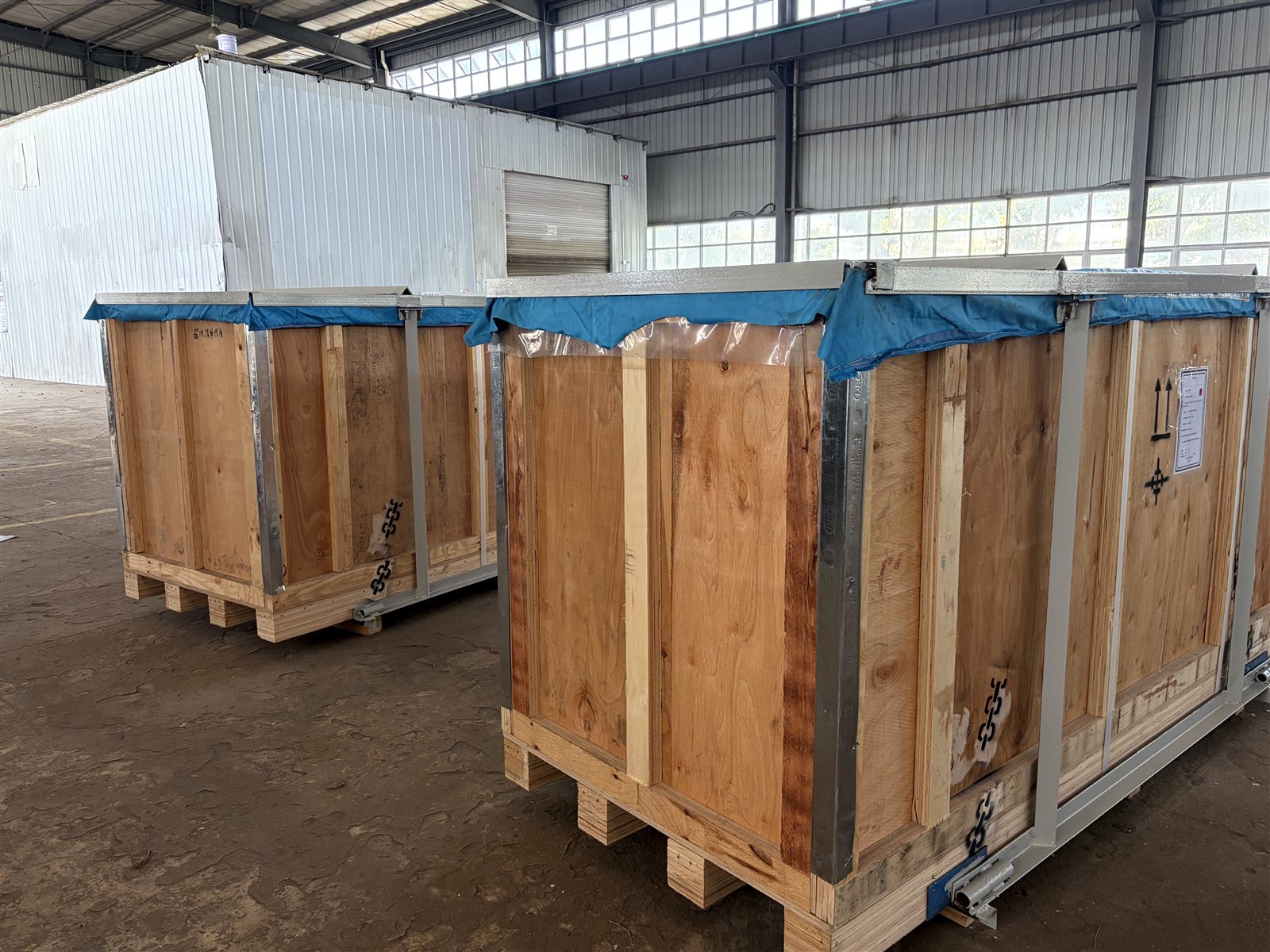
Start with three reference levels
A crate mark, a packing-list line and a pipe-support tag answer different receiving questions. Treating them as interchangeable can hide a shortage, duplicate count or unresolved accessory group. The receiving record should preserve the three levels and the source used for each value.
| Reference level | What it identifies | What it does not prove | Preferred source |
|---|---|---|---|
| Crate or package mark | A visible physical package | Exact contents, quantities, acceptance or product identity | Mark copied from the package, supported by a dated photograph |
| Packing-list line | How described goods are distributed across packages | That every listed item is physically present or acceptable | Controlled shipping document and its revision/date |
| Support tag or item reference | An individual support, assembly or controlled line item | That the item belongs to a crate unless the records link them | Buyer schedule, drawing, approved BOM/MTO or shipment record |
The U.S. International Trade Administration describes an export packing list as an itemized document that may include package type, quantity, description, package count, weights, marks and dimensions. That makes it useful for package-level reconciliation. It does not turn the packing list into an item-inspection or engineering-acceptance record.
A five-step crate-to-tag workflow
1. Capture only visible package facts
Record the package identifier exactly as shown. Add the receipt date, photograph reference and visible condition observations. If a character is hidden, damaged or unclear, copy the readable characters and mark the rest TBC. Do not reconstruct a missing mark from memory.
Keep the wording observational: “outer panel wet at receipt” is a visible condition; “water damage caused in transit” is a cause and acceptance conclusion that the photograph alone cannot establish.
2. Match the packing-list line
Confirm whether the visible package identifier appears in the controlled packing list. Compare package type, description, package count, weight and dimensions only where those fields are actually present. Record the document number, date or revision so a later update cannot silently replace the basis used at receipt.
If the physical mark and document disagree, preserve both values. The discrepancy should remain open until the shipper, buyer or document controller identifies the controlling correction.
3. Keep package count and item quantity separate
A correct count of five crates means five physical packages were received. It does not mean every assembly, loose bolt, rod, clamp or accessory listed for those crates is present. Use separate fields for packages received, expected quantity by packing-list line, visible item quantity after the authorized opening/check, and unresolved variance.
This separation matters for mixed shipments. One crate can contain several line items, while one line item can be split across several packages. A single “quantity received” column hides that relationship.
4. Reconcile controlled support tags
After opening under the receiver's approved process, compare each visible support tag with the applicable schedule row, drawing reference, BOM/MTO line or controlled item record. Copy the tag exactly before normalizing its format. If PS-101, PS 101 and PS101 appear in different records, preserve the source values and document the normalized key separately.
A photograph can help locate a visible tag, but it should not be used to infer material grade, hidden construction, load, finish, dimensions or project approval. For document-level reconciliation before fabrication, use the separate pipe support submittal package checklist.
5. Give every discrepancy an owner
Each unresolved line should include the package identifier, packing-list line, affected tag/item if known, exact discrepancy, evidence reference, next owner, required action and status. Avoid “check later.” A useful action reads: “Buyer document control to confirm whether PL-04 Rev 2 supersedes the mark shown on crate C-07.”
Use a short status set such as OPEN, TBC, ANSWERED and CLOSED. Record who supplied the answer and which document or message closed it.
Worked example: two crates, one split line and an unclear tag
Assume a packing list shows line 20 as “pipe support assemblies, quantity 12” distributed across crates C-04 and C-05. At receipt, both crates are present. After authorized opening, C-04 contains six clearly tagged assemblies. C-05 contains five clearly tagged assemblies and one item with a partly obscured tag.
| Check | Observed/controlled value | Receiving result |
|---|---|---|
| Physical package count | C-04 and C-05 present | 2 of 2 packages located |
| Packing-list line | Line 20, expected quantity 12 | Document expectation recorded, not yet closed |
| Clearly tagged items | 6 in C-04; 5 in C-05 | 11 tags can be reconciled |
| Unclear item | 1 item in C-05; tag partly obscured | Tag identity TBC; preserve photograph |
| Quantity conclusion | 12 physical items visible | Physical count matches, but tag reconciliation remains open |
The package count is correct and the visible item count is 12, but the receiving record should not state “line complete” until the unclear tag is confirmed against the controlled record. This example is generic and does not represent an actual customer shipment.
Minimum receiving record
| Field | Entry rule | Example placeholder |
|---|---|---|
| Receipt/date reference | Use the receiver's controlled record or timestamp | RCV-YYYYMMDD-01 |
| Package mark | Copy exactly; unclear characters remain TBC | C-0? |
| Packing-list document | Record document number and revision/date | PL-XXX Rev TBC |
| Packing-list line | Use the controlled line reference | Line 20 |
| Expected package count | Do not mix with item quantity | 2 crates |
| Expected item quantity | State source and unit basis | 12 assemblies |
| Visible item/tag record | Enter after approved opening/check | PS-___ |
| Discrepancy | Describe observable mismatch without assigning cause | tag partly obscured |
| Owner/action | Name the responsible function and the record required | buyer document control to confirm |
| Status/closure evidence | Keep TBC until a controlled answer is attached | TBC / reference pending |
What a wood-packaging mark means—and does not mean
International Plant Protection Convention guidance for ISPM 15 concerns regulated wood packaging material, including phytosanitary treatment and marking. The scope is the wood packaging. Such a mark should not be presented as evidence of the product contents, pipe-support material, quantity, inspection acceptance, project approval or delivery completeness.
The photograph on this page is not used to assert that the crates carry an ISPM 15 mark or comply with a treatment requirement. Import, customs and wood-packaging decisions remain with the responsible exporter, importer, freight forwarder and applicable authorities.
Common reconciliation failures
| Failure mode | Why it creates risk | Better control |
|---|---|---|
| Crate count copied into item quantity | Packages and assemblies become indistinguishable | Use separate package and item fields |
| Unreadable mark silently corrected | The audit trail no longer shows uncertainty | Preserve visible value and mark missing characters TBC |
| One photograph treated as proof of all contents | Hidden or separately packed items remain unchecked | Link each photograph to one package and controlled line |
| Tag normalized without retaining source value | A later mismatch can no longer be reconstructed | Keep source tag and normalized key in separate columns |
| Loose hardware counted without parent reference | Accessories can be double-counted or orphaned | Link loose lines to a parent tag/drawing and package |
| Discrepancy closed by verbal assumption | No controlling evidence remains for the next reviewer | Attach the written answer or revised document |
Connect receiving evidence back to the RFQ
A well-structured RFQ makes later receipt easier because its tag, quantity and document references can be reused in the packing and receiving records. Before quotation, start with what to send for a pipe support quotation and how to read a hanger schedule. If the enquiry contains beam clamps or clevis components, use the beam clamp and eye nut checklist and clevis hanger comparison to keep connection fields visible.
At receipt, carry the same parent tag and quantity basis into the crate-to-tag record. Do not reopen an engineering decision through the receiving worksheet. The worksheet reports what was documented and observed; design acceptance remains with the responsible buyer and project engineer.
FAQ
Is a crate mark the same as a packing-list line?
Not necessarily. A crate mark identifies a physical package, while the packing list records how goods are distributed across packages. Reconcile the two instead of assuming they are identical.
Does a correct crate count prove that item quantity is complete?
No. Package count and item quantity are separate fields. Item-level confirmation depends on the authorized receiving check and the controlling shipment records.
What should happen when a package mark is unreadable?
Preserve the photograph, record only the visible characters, mark the unclear field TBC and confirm it against the packing list or shipper's controlled record.
Does an ISPM 15 mark describe the contents of a wooden crate?
No. It concerns regulated wood packaging material and its treatment and marking framework, not the identity or acceptance of the products inside.
Prepare a reviewable record
Keep the package mark, packing-list line, item/tag reference, discrepancy and closure evidence in one traceable record. If you are preparing a pipe-support enquiry or need to identify which schedule, drawing or BOM fields remain open, send the controlled document set to PipeAnchor Supply. We can identify missing supplier-review inputs; final design, import, receiving and acceptance decisions remain with the responsible parties.